IPTV Stream: How It Works and How to Keep It Stable
An IPTV stream is video sent to your screen in small pieces over the internet. Once you know how it travels, most freezing problems become easy to find and fix.
When an IPTV stream works, nobody thinks about it. When it freezes in the 89th minute, everybody has a theory: the server, the television, the weather. Usually the explanation is simpler, and it is found in the last few metres between the router and the screen.
This guide explains what a stream is, in plain language: how the picture leaves a server and arrives on your television, what words like bitrate and buffer really mean, why live sport reaches you a little late, and which settings and habits keep an IPTV stream steady.
It is deliberately technical. If you are choosing a plan rather than tuning one, start with the guide to the IPTV subscription or go straight to the 24-hour trial.
Reply in English within minutes, 24 hours a day.
1 hour free or 24 hours for €2.95.
What is an IPTV stream?
A stream is a programme sent as a continuous flow of data instead of a broadcast signal. The video is cut into small chunks, each a few seconds long. Your player requests them one after another, joins them back together and shows the result. You never download the whole programme; you receive it as you watch.
IPTV means that this flow travels by Internet Protocol, the same language your browser and your email use. That is the whole difference from aerial or satellite television: the picture arrives through your broadband, so its quality depends on that connection.
Three kinds of stream exist inside one subscription:
- Live streams: channels as they are broadcast, with no beginning and no end.
- Catch-up streams: recent programmes of a live channel, which you can restart or rewind.
- On-demand streams: movies and series stored as files, which you can pause and move through freely.
How an IPTV stream reaches your TV
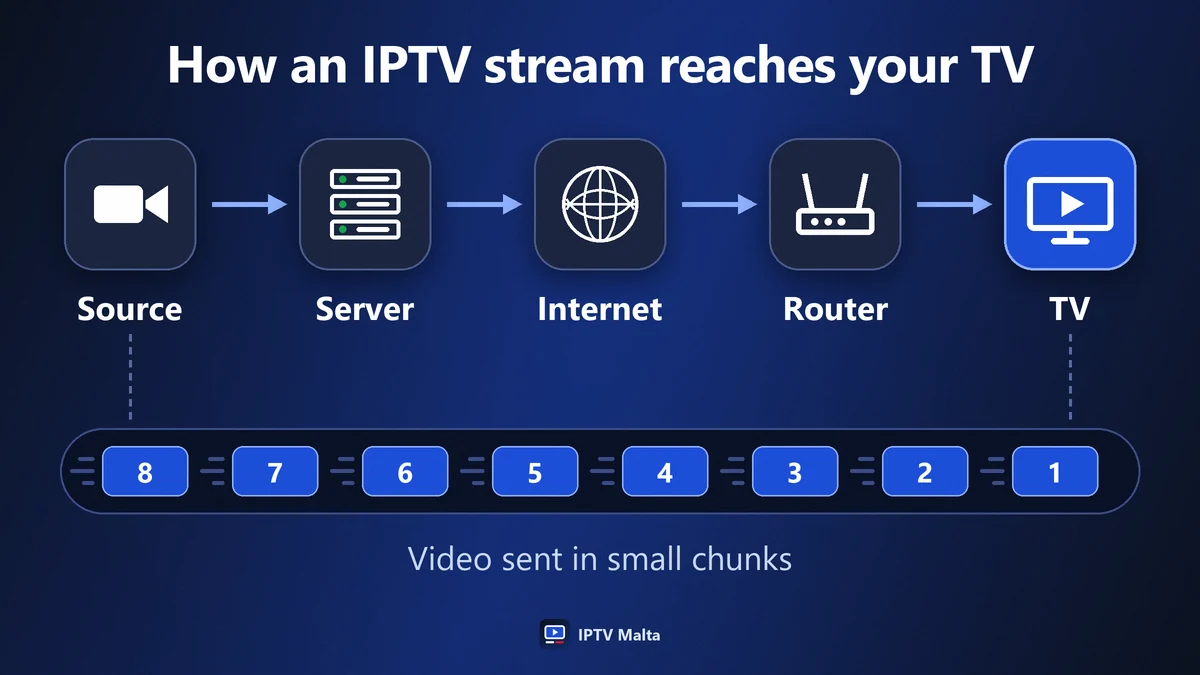
Between the source and your sofa, the picture passes through five stages. A problem at any one of them looks the same on screen.
1. The source
The channel as it is produced. If the source is poor, nothing downstream can improve it.
2. The server
It prepares the stream in several qualities and sends it to thousands of viewers at once. When too many connect to one machine, everyone suffers, which is why serious services spread the load over several servers.
3. The internet
The route between the server and your provider. It is normally invisible, but it can slow at peak hours.
4. Your router
It shares the connection between every device in the home. A download on a console and a stream on the television compete for the same line.
5. Your device
The television, stick or box that decodes the video. An old or overloaded device can stutter on a stream that arrives perfectly.
The useful habit is to ask where the picture is failing before asking why. The checks further down work through these stages from your end backwards.
Stream formats: TS, HLS and what your player shows
You may meet two names in a player’s settings. They describe how the chunks are packaged, and either can carry the same channel.
| Format | How it works | In practice |
|---|---|---|
| MPEG-TS | One continuous flow | Opens fast, less tolerant of an unsteady line |
| HLS | A list of short files | Copes better with a line that varies |
Most players choose for you, and you rarely need to care. If a player offers the choice and a channel stutters on a connection that varies, such as mobile data, switching the stream format to HLS is worth trying.
M3U and Xtream Codes are not stream formats
They are two ways of giving a player the list of streams. An M3U link is one address containing the whole list. Xtream Codes is a server address with a username and a password. The streams behind them are the same.
Resolution, bitrate and codec: what decides the picture
Three values describe the quality of an IPTV stream, and they are often confused.
Resolution
The number of points in the picture: SD, HD (720p) or Full HD (1080p). It tells you how fine the image can be, not how good it is.
Bitrate
The amount of data sent each second. This is what really decides the look of fast action. Two Full HD streams can differ greatly: one with a generous bitrate shows the ball clearly, one that is starved turns grass into a smear.
Codec
The method used to compress the video. H.264 plays on everything. H.265 gives the same picture with roughly half the data, but older devices struggle to decode it. If one channel shows a black screen with sound on an old television, the codec is the usual reason.
Frames per second
Sport looks natural at 50 frames per second and slightly jerky at 25. It is one more reason a sports channel needs more data than a talk show.
The internet speed an IPTV stream needs
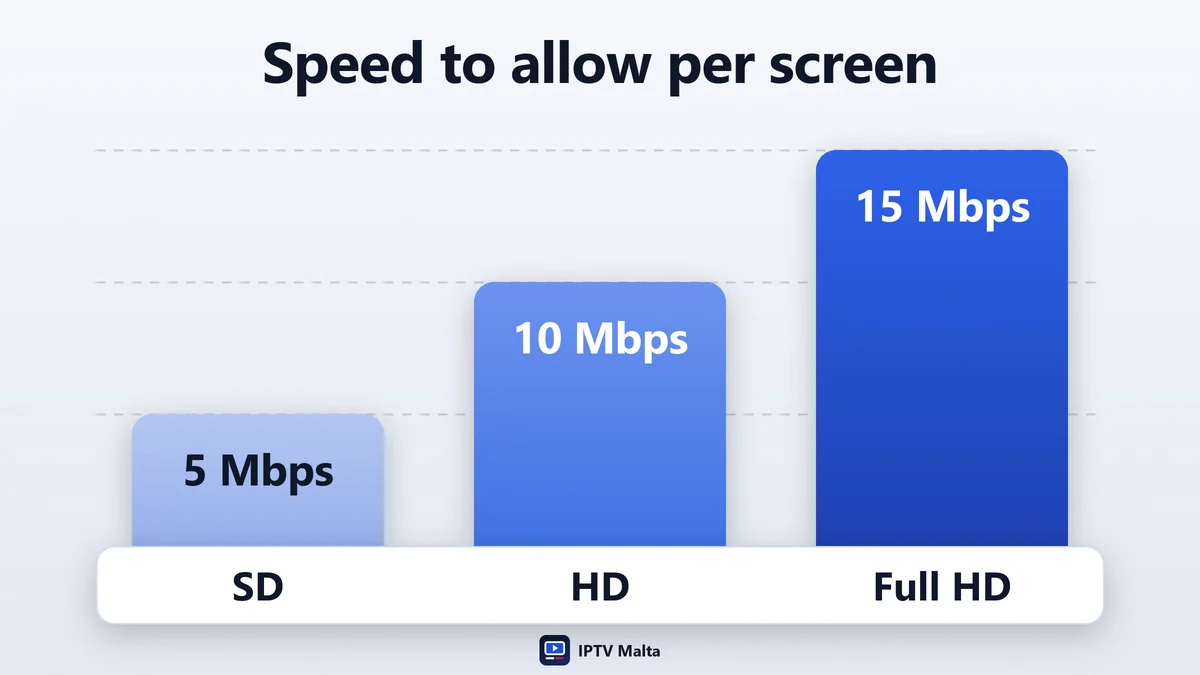
A stream uses less than most people think. The figures below include a margin, because a line that only just covers the bitrate leaves the player nothing in reserve.
| Quality | Speed to allow per screen | Data used per hour |
|---|---|---|
| SD | 5 Mbps | About 0.7 GB |
| HD (720p) | 10 Mbps | About 1.5 GB |
| Full HD (1080p) | 15 Mbps | About 3 GB |
These are per screen playing at the same time. Two televisions in Full HD need 30 Mbps between them, plus whatever phones and laptops are doing. Fibre and cable broadband in Malta and Gozo are far above this; the figure that matters is the speed measured at the television, not the one printed on the contract.
The buffer: why a stream pauses
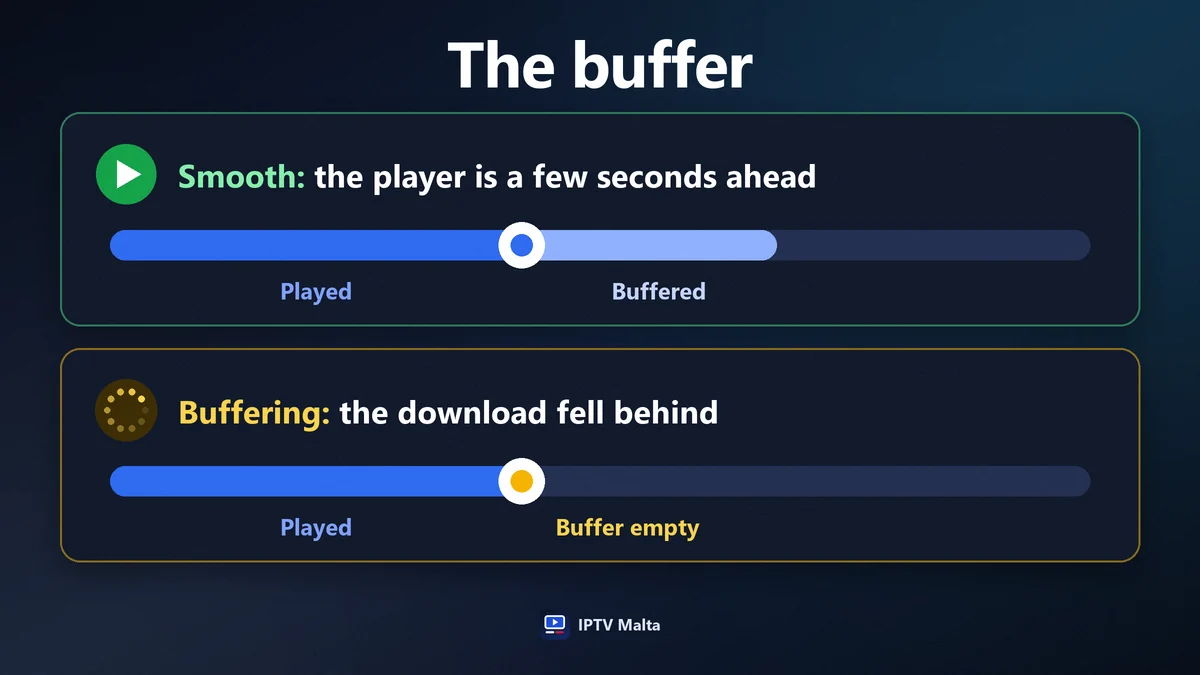
Your player never shows a chunk the instant it arrives. It keeps a few seconds in reserve, called the buffer, and plays from that reserve. As long as chunks arrive at least as fast as they are played, the reserve stays full and you see nothing.
When the download falls behind, the reserve empties. The picture stops, a spinner appears, and playback resumes once a few seconds have been collected again. That is buffering. It is not a fault in itself; it is the player waiting for data.
A larger buffer hides short dips in the connection, at the price of a slightly longer wait when you change channel. Some players let you set it. Raising it is useful on a line that is fast on average but irregular.
IPTV stream buffering: find the cause in order
Work from your own home outwards. Each step takes a minute and rules out one stage of the journey.
- Try another channel. If only one freezes, the cause is that stream’s source, not your home. Report it and move on.
- Lower the quality. Switch from the Full HD version to HD. If the freezing stops, the connection reaching the device is the limit.
- Test the speed on the device itself, with a speed-test app on the television or stick. A phone beside the router proves nothing.
- Restart the router and the device. It clears slowdowns that build up over days.
- Stop other heavy uses. A game update or a cloud backup can occupy the whole line.
- Connect by cable, even temporarily. If the problem disappears, Wi-Fi was the cause.
- Try with and without a VPN. A slow VPN causes freezing; on some networks a good one prevents it.
If every channel freezes on a cabled device with a good speed test, the cause is outside your home. Tell support what you tested: it saves ten minutes of questions.
Say which channel and what you already tried.
Wi-Fi or cable: the home network decides
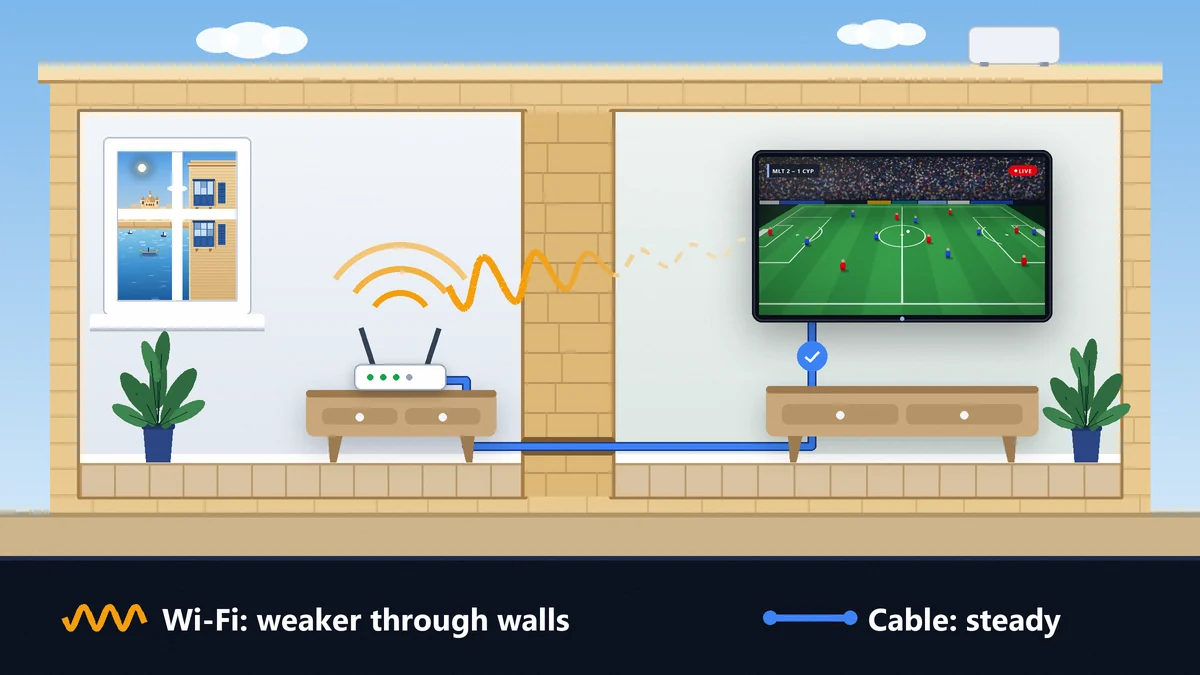
In most homes the weakest link is the last one. The line is fast; the signal that reaches the television is not.
Why Wi-Fi drops
Every wall and floor absorbs part of the signal. The thick limestone walls of traditional Maltese houses absorb a great deal: a connection that is excellent beside the router can lose most of its speed two rooms away.
2.4 GHz or 5 GHz
The 5 GHz band is faster and less crowded but has a shorter reach. The 2.4 GHz band goes further and is slower. Close to the router, use 5 GHz; far from it, 2.4 GHz may be the steadier of the two.
Three fixes, from best to simplest
- An Ethernet cable from the router to the television: the definitive answer.
- A powerline adapter: the signal travels through the electrical wiring, with no new cable to run.
- A mesh point near the television: it rebuilds a strong Wi-Fi signal in that room.
Why a live IPTV stream is a little behind
A live stream is not instant. Cutting the video into chunks, sending them and keeping a few seconds in reserve adds up to a delay, typically some tens of seconds behind an aerial or satellite broadcast.
It is normal, it is the same for every internet stream, and it has one practical consequence: a neighbour watching by aerial may cheer before you see the goal. Two habits help.
- Silence score notifications on your phone during a match.
- Do not shrink the buffer to gain seconds. You would trade a small delay for a picture that stops.
How your device affects the stream
The same stream can look different on two screens in the same house.
Processing power
A recent Smart TV or stick decodes Full HD without effort. An older one may drop frames on demanding channels while playing lighter ones perfectly.
Memory and background apps
Sticks and boxes slow down when several apps stay open. Closing them, or restarting the device once a week, is often enough.
The player
Some players expose a choice between hardware and software decoding. Hardware decoding is the right default; software decoding is the fallback when a single channel misbehaves. The devices we support are listed in the installation guide.
Several streams at once
Each screen that plays is one stream. A 1-screen plan allows one at a time; 2-screen and 3-screen plans allow two or three. Opening a second stream on a 1-screen plan stops the first, which is the origin of the message “too many devices”.
Each stream also needs its own share of the line. Three Full HD streams ask for about 45 Mbps in total. The way screens are counted and priced is explained in the guide to the IPTV subscription.
1, 2 or 3 streams at the same time.
What the provider controls
Not everything is in your hands. Three things depend on the service, and they are the ones worth testing before you subscribe.
- Capacity at peak time. Redundant servers share the load when the audience climbs, so that a final does not overload one machine.
- Several qualities per channel. Full HD, HD and SD versions let you match the stream to the connection in front of you.
- Replacement of a faulty stream. When a channel’s source fails, it has to be noticed and switched quickly.
We run redundant servers in Europe and aim for 99.9% uptime. How to judge these points on any service is covered in the guide to the IPTV service.
An IPTV stream on mobile data
4G and 5G carry a stream well when the signal is steady. Two points deserve attention.
The allowance
At about 3 GB an hour in Full HD, a football match uses around 6 GB. Choosing the HD version halves it, and SD halves it again, with little visible loss on a phone screen.
The signal
A moving phone changes mast constantly. On a bus or a ferry, expect short pauses whatever the service; the HD or SD version rides them out better than Full HD.
Peak time: why 21:00 is the real test of a stream
A stream is shared infrastructure. The server sends it to many viewers, your provider’s network carries it alongside your neighbours’ traffic, and your own router divides the line between everyone at home. All three are busiest at the same moment: the evening.
- On the server, a big match multiplies the audience of a few channels within minutes.
- On the network, the whole street is streaming, gaming and video-calling at once.
- At home, the television, two phones, a console and a laptop all want their share.
This is why a stream that looks perfect at lunchtime proves nothing, and why any trial should be used between 20:00 and 23:00. If the picture holds then, it will hold the rest of the day.
Catch-up and on-demand streams behave differently
Not every stream is live, and the difference explains why a film can play perfectly on an evening when a match stutters.
Live streams have no reserve upstream
The programme is being produced as you watch. Your player can only hold the few seconds that already exist, so any dip in the connection is felt quickly.
On-demand streams are files
A film is stored whole. The player can load well ahead of what you are watching, pause without losing anything and jump to another point. A short dip is absorbed without you noticing.
Catch-up sits between the two
It replays a recent part of a live channel from a recording. It can be paused and rewound like a file, within the period the channel keeps.
IPTV stream vocabulary in one table
The words that appear in players and in support conversations, in plain terms.
| Word | What it means | Why it matters |
|---|---|---|
| Stream | Video sent in small chunks as you watch | Its quality follows your connection |
| Bitrate | Data sent per second | Decides how fast action looks |
| Buffer | Seconds of video held in reserve | Empties when the download falls behind |
| Codec | The compression method (H.264, H.265) | Old devices may not decode H.265 |
| EPG | The TV guide | Shows what is on now and tonight |
| Catch-up | Replay of a recent live programme | Lets you restart or rewind |
| M3U | One link holding the channel list | Accepted by almost every player |
| Xtream Codes | Server, username and password | Loads channels, library and guide sorted |
Common mistakes with IPTV streams
Most lost evenings come from one of these.
Blaming the service first
If one device freezes and another in the house does not, the stream is not the problem. Compare before you conclude.
Trusting the speed on the contract
A 500 Mbps line can deliver 8 Mbps behind two walls. Measure where the television is.
Forcing the highest quality everywhere
Full HD on a bedroom television at the far end of the house is a recipe for pauses. The HD version on a weak signal looks better than a Full HD one that stops.
Testing a stream in the afternoon
Lines and servers are busiest between 20:00 and 23:00. That is the only test that predicts your evenings.
The stable IPTV stream checklist
Seven points cover nearly every home:
- The main television is connected by cable, powerline or a nearby mesh point.
- The speed measured on the device is at least 15 Mbps for Full HD.
- The router is restarted from time to time.
- Heavy downloads are not running during a match.
- The quality chosen matches the room: Full HD near the router, HD far from it.
- The device is recent enough, or restarted weekly.
- You know which channel version to fall back on.
With those in place, what remains is the quality of the service itself. The way to compare one with another is in the guide to the best IPTV, the questions to put to a seller are in the guide to IPTV providers, and the channels and prices for the islands are in the IPTV subscription Malta guide.
Frequently asked questions
- What is an IPTV stream?
- It is a television programme sent over the internet as a continuous flow of small video chunks. Your player requests them one after another and plays them, so you watch without downloading the whole programme.
- What internet speed does an IPTV stream need?
- Allow 5 Mbps for SD, 10 Mbps for HD and 15 Mbps for Full HD, for each screen playing at the same time. Measure the speed on the television itself, not next to the router.
- Why does my IPTV stream keep buffering?
- The player is receiving video more slowly than it plays it. The cause is most often a weak Wi-Fi signal at the television, another device using the line, or a quality too high for the connection. Try another channel, then a lower quality, then a cable.
- Why is a live IPTV stream behind the aerial broadcast?
- Because the video is cut into chunks, sent over the internet and held for a few seconds in the player’s buffer. A delay of some tens of seconds is normal for every internet stream.
- Does a VPN improve an IPTV stream?
- Sometimes. On a network that slows video at peak hours, a fast VPN can help. A slow VPN makes things worse. Test with and without it and keep whichever is steadier.
- How much data does an IPTV stream use?
- About 0.7 GB an hour in SD, 1.5 GB in HD and 3 GB in Full HD. A football match in Full HD uses around 6 GB.